Sunrise Integration Guide
Adding Support for VFX
When an alarm rings it plays a VFX from the top of the clock. To add support in your object follow these steps:
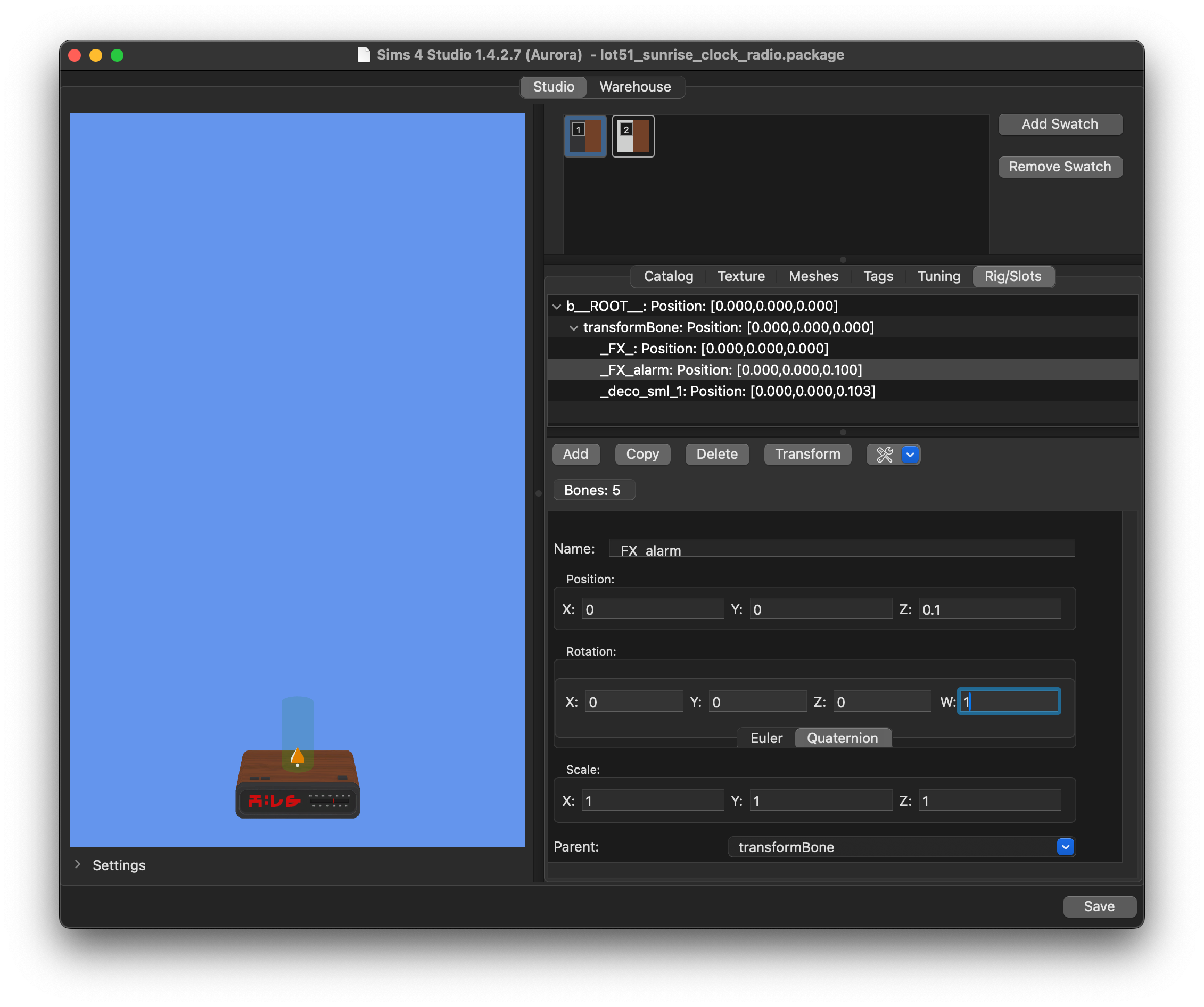
- Add a slot to your object named _FX_alarm and position it slightly above the top edge. In my case Z is set to 0.1.
- Change the Orientation tab to Quarternion. Change the W field to 1 this will rotate the slot 90 degrees as the HSY vfx is positioned horizontally.
Image
Finalize Integration
To let Sunrise add the necessary interactions and states to trigger alarms you'll need to create a tuning snippet and add it to your package.
There are two ways you can define your objects. If you have a custom object tuning shared among multiple objects/swatches you can set it in object_tuning. Otherwise if you're using an existing EA tuning, add the ID for each swatch's definition into the definitions list.
Be sure to rename the snippet and rehash the instance ID.
Example:
<?xml version="1.0" encoding="utf-8"?>
<I c="SunriseIntegrationManifest" i="snippet" m="lot51_sunrise.snippets.integration" n="CREATOR_NAME:SunriseIntegrationManifest" s="1234">
    <L n="compatible_objects">
        <U>
            <T n="object_tuning">1234<!--CREATOR_NAME:Your_Object--></T>
            <L n="disabled_states">
                <T>15076<!--Brokenness_Broken--></T>
            </L>
            <L n="loot_on_alarm">
                <T>39601<!--loot_Statistic_Breakage_Sink--></T>
            </L>
        </U>
        <U>
            <L n="definitions">
                <T>1234</T>
            </L>
        </U>
    </L>
</I>